You opened this page in the Facebook app. To install Drone Wind, open it in your browser: menu ⋯ or ⋮ → “Open in browser” (Safari or Chrome).
Everything a pilot checks before a flight, on one screen:
Works with any droneTested and used in real-world operations with Specific and Certified category drones
Not just weather modelsForecasts are refined with real observations from your locations
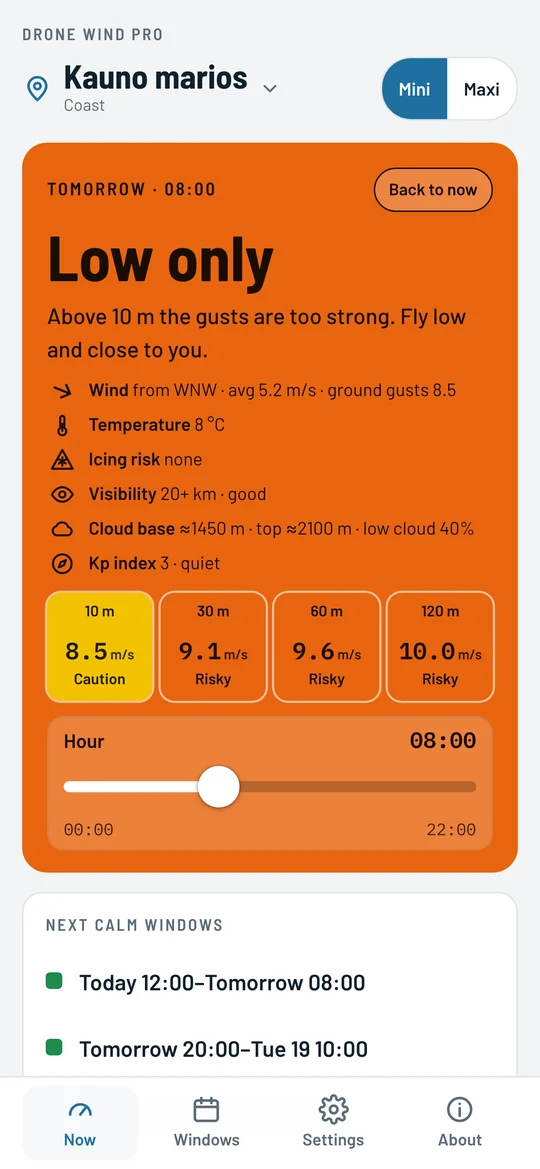
MGRS coordinates
The place can be entered and set not only in degrees or from your phone's GPS, but also in MGRS format, the NATO standard used by the military and by search and rescue. Type the point from your task straight into the app and see the wind and its direction, visibility, fog, rain, cloud, temperature and Kp index at that point at once, with no conversion to degrees.
The number of digits sets the precision: LA 1 8 – 10 km, LA 142 837 – 100 m, LA 14245 83732 – 1 m.
How it works
Wind at ground level, at 120 m and at 2000 m is not the same, especially the gusts. The app assesses the wind at each altitude and compares it with your drone's limit. Then it weighs up visibility and fog, rain and snow, cloud, temperature, icing risk and the Kp index: each of them can make the answer stricter. In the card each topic has its own row and icon. We also adjust the forecast with real-life measurements from the areas you choose, wherever they are available.
Gusts stay well below the drone's limit at every altitude, with no fog, rain, icing risk, frost or magnetic storm.
Gusts are noticeable, or there is fog, an icing risk (+1 °C or colder), a magnetic storm or rain your drone can take. You can fly, but stay alert.
Higher up the gusts approach the limit. Fly low and close to you. Low cloud also limits how high you can go.
Gusts exceed the drone's limit even at ground level. Also rain the drone can't take, snow or too much cold.
Try it yourself
Lengviems dronams · vėjo riba 10,7 m/s · aukščiai iki 120 m
Pavyzdys su apytiksliais skaičiais. Programėlė skaičiuoja iš tikros jūsų vietos prognozės ir dar įvertina rūką, lietų, debesis, temperatūrą ir Kp indeksą.
Features
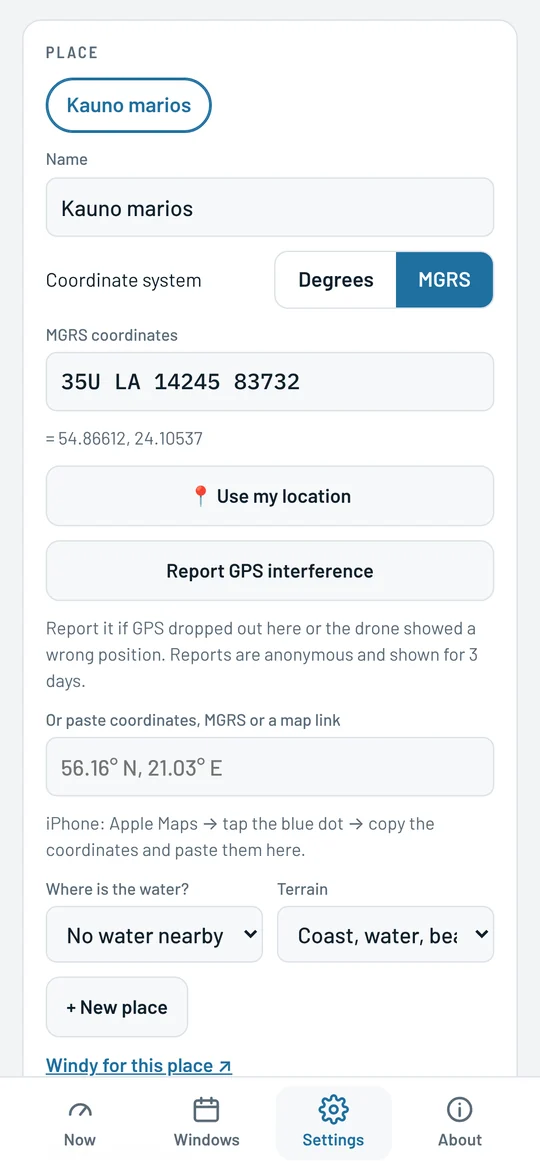
Switch the coordinate system to MGRS in Settings and enter, for example, 35U LA 14245 83732. The app checks the zone, band and square, shows the precision from 10 km to 1 m, and takes a missing zone from your current place. With MGRS selected, your GPS position is shown in the same format.
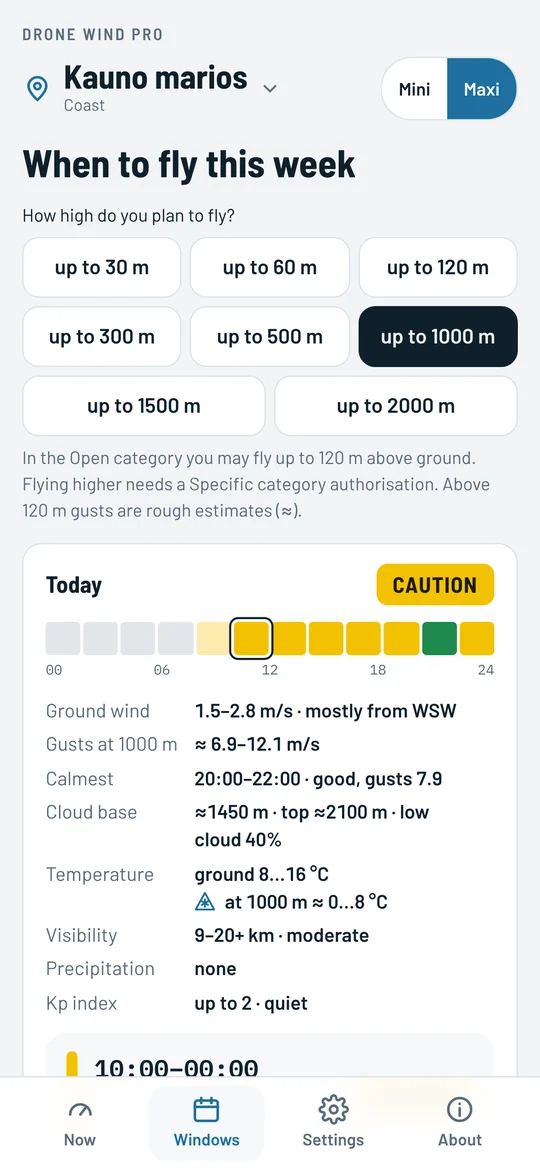
Pick how high you will fly and see which hours work each day. A square's colour is the same answer you get when you tap it, at the altitude you picked. The day summary has wind at ground level and its direction, gusts at your altitude, the calmest time, cloud base, visibility, rain, the Kp index and temperature – in Pro also at your chosen altitude. Free version: today. Pro: the whole week.
At the bottom of the main card there is a slider for the hours of the day. Slide it and the card instantly shows the forecast for that hour: the answer and its colour, wind, temperature, icing risk, visibility, cloud, the Kp index and the tile for each altitude. The card keeps its size while you slide, and the slider sits below the tiles so your hand does not cover them. “Back to now” returns to the current hour. Works in the free version too.
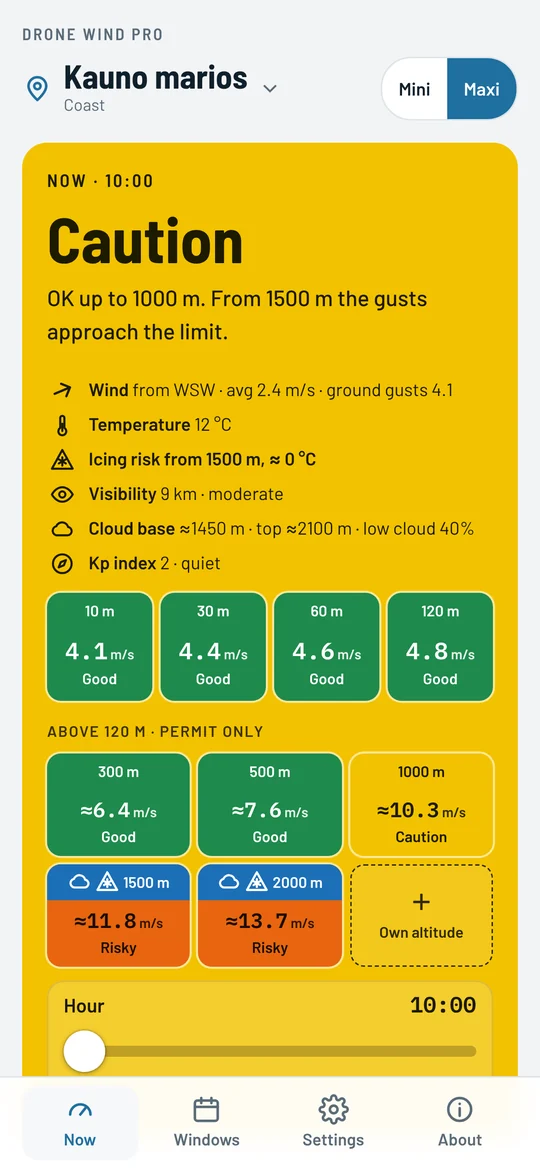
For larger drones and flights with an authorisation: wind, temperature and icing risk at 300, 500, 1000, 1500 and 2000 m. Altitudes in cloud are marked grey and those with icing risk blue: there the answer is “Caution” at best, and from −10 °C “Don't fly”. Pick an altitude in the windows and you see the temperature at exactly that altitude. The main answer tells you how high you can go: “OK up to 1000 m”. Gusts that high are rough estimates (≈).
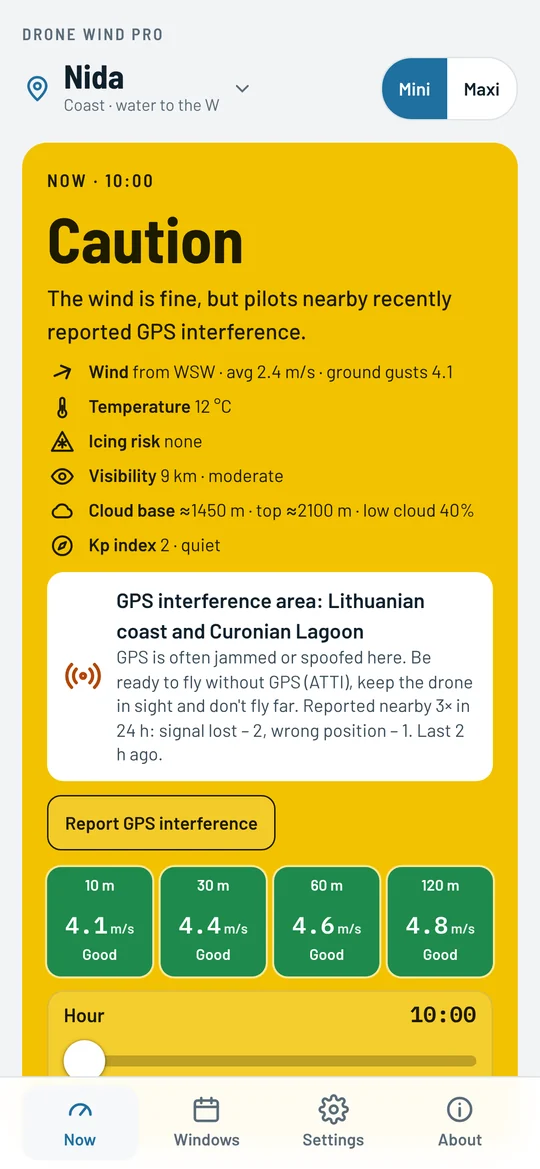
The app warns you when you are in a known GPS jamming zone or near places where pilots recently reported interference. Everyone sees the reports; Pro users can send one themselves, with one tap and anonymously. The Kp index shows magnetic storms, when compass and GPS may be off.
Visibility is always shown, up to 20 km, along with when it improves. Fog makes the answer stricter. Rain the drone can't take and snow mean “Don't fly”.
An arrow shows where the wind blows. When it blows off the shore, the app reminds you that the drone may not make it back against the wind and drift over the water.
From +1 °C it warns of icing risk and makes the answer “Caution” at best. In the cold it reminds you that the battery drains faster.
In Pro the windows show the temperature not just at the ground but at your chosen altitude, up to 2000 m.
Shows the approximate cloud base and marks the altitudes where the drone would already be in cloud.
Coast, fields, forest or city: the app takes your surroundings into account.
Paste degrees, MGRS or a map link and the place fills in by itself.
Set the wind limit and, in Pro, the rain resistance from your drone's manual. Speeds are shown in m/s or knots.
Pricing
The free version answers the key question: can I fly today. Pro is for pilots who plan ahead or fly higher.
Free
0 €
Pro
20 € per year
or €5 per month (€60 a year)
Paying yearly you save €40 – 67%
Cancel any time in the app's About section. Payments are handled by Stripe.
Custom
Flying a different drone, running a fleet or doing specialised work? We can prepare a separate version of the app with your drone's parameters.
Tell us which drone you fly and what you need: [email protected]
Install
Drone Wind runs in the browser, so there is no App Store or Google Play to go through. Once on your home screen it opens like any other app and works offline with the last forecast.
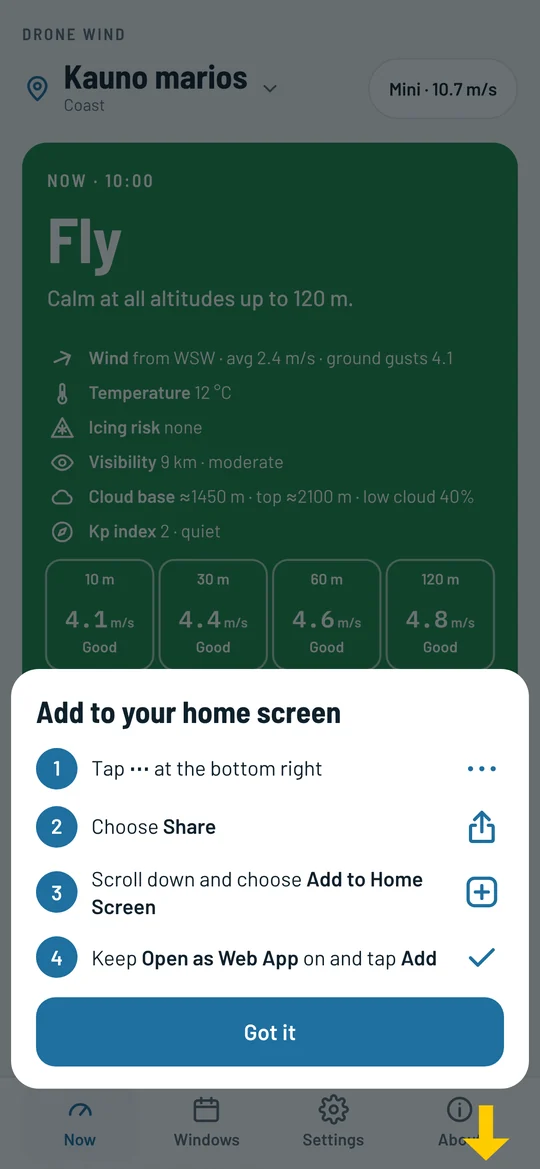
Open fly.dronewindapp.com on your phone and an install offer appears below the forecast. On Android and in Chrome on a computer it takes one tap. On iPhone you get the steps for your iOS version and an arrow to the right button. If you opened the link in Facebook or Messenger, the app explains how to open it in your browser.
Pro has its own icon: install it the same way from fly.dronewindapp.com/pro/.
Opened the link in the Facebook or Messenger app? Open it in your browser first (menu ⋯ or ⋮ → “Open in browser”): only Safari or Chrome can add the app to your home screen.
FAQ
No. The app shows a weather forecast and the conclusions worked out from it. It is a recommendation: the remote pilot decides whether to fly and is responsible for it. Before a flight, check airspace restrictions and the conditions on site.
Visibility and fog: visibility is always shown, and in fog the answer is “Caution” at best. Rain and snow: depending on how much water your drone can take; snow always means “Don't fly”. Cloud: the cloud base is shown, altitudes in cloud are marked and the flying height is capped below the cloud. Temperature: from +1 °C there is an icing risk and the answer is “Caution” at best; in severe cold, “Don't fly”. Kp index: during a magnetic storm the answer is “Caution” at best.
The forecast comes from Open-Meteo (CC BY 4.0). Various other data sources are used as well.
Any. Mini is for light drones, Maxi (in Pro) for larger ones. Both come with default limits: Mini – wind up to 10.7 m/s and altitudes up to 120 m, Maxi – 14 m/s and up to 2000 m. You can change the wind limit to match your drone's manual, and in Pro you can also set how much rain your drone can take. For other drones we can prepare a custom version.
In the Open category you may fly up to 120 m above ground. Higher needs a Specific category authorisation. The Maxi altitudes up to 2000 m are for pilots who have one.
MGRS (Military Grid Reference System) is a grid coordinate system and a NATO standard. In the field it is handier than degrees: a point is a short code, distances are in metres, and the number of digits shows the precision at a glance. When your task gives the place in MGRS, Drone Wind shows the forecast for exactly that point.
There are no accounts. Places and settings stay on your phone only. To get the forecast, the place's coordinates, rounded to about 100 m, are sent to the weather server. Buying Pro needs only an e-mail address, and Stripe handles the payment.
In the app's About section, tap Manage subscription. Pro keeps working until the end of the paid period. Cancel within the 7 trial days and you pay nothing.
It runs in the browser: there is nothing to download, and updates reach everyone at once. App Store and Google Play versions are planned later.
Yes. On the other phone or computer, open Pro, choose “I already have Pro” and enter the e-mail address you used when buying. We send a code that switches Pro on there.
